 Pitch on Cue
KNOW THE NOTE YOU PLAY
How to tell what note you’re playing on a harmonica
Play one sustained note into a chromatic tuner or a note-recognition app. Compare the result with your harmonica’s note chart. You don’t need to identify the sound by ear first.
Check your note in three steps
Find the note you expect
Check your harmonica’s model and key, then find its note chart. Match the hole and breath direction: blow means breathe out; draw means breathe in. On a chromatic harmonica, also check whether the slide button is pressed.
Play one note and read the display
Open a chromatic tuner or note-recognition app and allow microphone access. If your tuner offers instrument presets, choose chromatic mode. Pause background music, play one hole gently, and hold the sound long enough to read it.
Compare, stop, then try again
Compare the displayed note with your chart. Stop, then play the same note again to see whether the result repeats.
A matching note name answers “which note?” It does not, by itself, tell you how far sharp or flat you are, or whether your tone is clean.
See the note on a harmonica layout
Pitch on Cue is our iPhone harmonica practice app. Before starting a practice session, tap the ear icon (Sound check), allow microphone access if prompted, and choose Note names. Play a note and look for the highlighted labels.
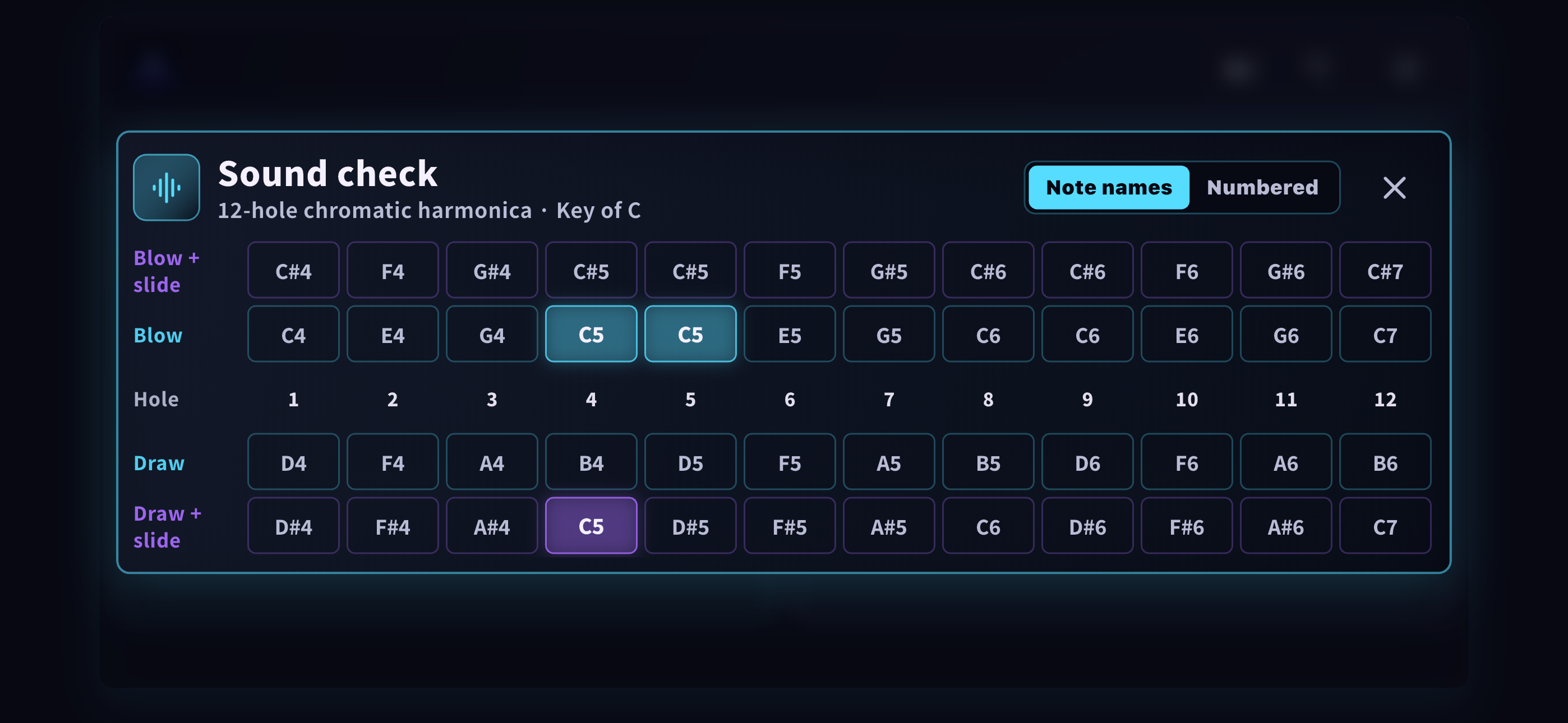
Its layout is for a 12-hole C chromatic harmonica. Some notes occur in more than one position, so several matching cells can light up for one detected note. The app detects notes, not the physical hole you used.
Once you can find the note again, try practice mode to respond to note targets with your harmonica.
Get Pitch on Cue for iPhoneFree to download, with an optional one-time purchase for the full version.
If the result isn’t what you expected
The display keeps changing
First check whether you’re sounding neighboring holes. Try one sustained note again before changing your setup. This single-note lesson explains ways to isolate a note.
Nothing registers
Check microphone permission for the app or website. Then pause background music and try a sustained note again.
I consistently see a different note
Recheck the hole, breath direction, slide and chart. A mismatch alone doesn’t prove the instrument needs repair. HOHNER’s FAQ explains how breath and mouth position affect the sound.